/ Mar 22, 2026
Trending
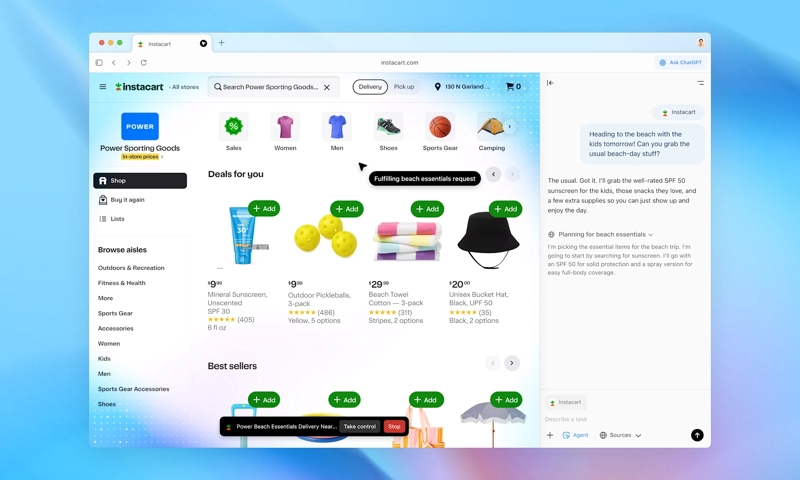

OpenAI Launches ChatGPT Atlas Browser – Image Credit OpenAI
OpenAI has launched ChatGPT Atlas, a web browser that incorporates ChatGPT and is available worldwide on macOS.
OpenAI has announced the release of ChatGPT Atlas, a new web browser that integrates the ChatGPT language model. The browser is now available globally on macOS for Free, Plus, Pro, and Go users. A beta version is accessible for Business users and, if permitted by their plan administrator, for Enterprise and Edu users. Versions for Windows, iOS, and Android are anticipated to be released soon.
ChatGPT Atlas is designed to enhance user interaction with the web by integrating ChatGPT directly into the browsing experience. This integration allows users to utilize ChatGPT’s capabilities across various web activities without needing to switch between applications or copy and paste information. The browser supports features like browser memories, which allow ChatGPT to remember context from visited sites to assist users in future interactions. These memories are optional, with users having control over their storage and deletion.
The browser also includes an agent mode, which allows ChatGPT to perform tasks such as researching, analyzing, and automating processes within the browser environment. This feature is currently in preview for Plus, Pro, and Business users. Users can manage their privacy by controlling what ChatGPT can access and remember, with options to clear specific pages or entire browsing history.
ChatGPT Atlas aims to streamline web navigation and task management by providing a centralized platform for browsing and interaction. The browser’s new tab page offers a starting point for searches and queries, with additional tabs for specific types of content like images and news.
The release of ChatGPT Atlas marks OpenAI’s entry into the browser market, positioning the company to compete with established web browsers by leveraging its AI technology.
OpenAI Launches ChatGPT Atlas Browser – Image Credit OpenAI
OpenAI has launched ChatGPT Atlas, a web browser that incorporates ChatGPT and is available worldwide on macOS.
OpenAI has announced the release of ChatGPT Atlas, a new web browser that integrates the ChatGPT language model. The browser is now available globally on macOS for Free, Plus, Pro, and Go users. A beta version is accessible for Business users and, if permitted by their plan administrator, for Enterprise and Edu users. Versions for Windows, iOS, and Android are anticipated to be released soon.
ChatGPT Atlas is designed to enhance user interaction with the web by integrating ChatGPT directly into the browsing experience. This integration allows users to utilize ChatGPT’s capabilities across various web activities without needing to switch between applications or copy and paste information. The browser supports features like browser memories, which allow ChatGPT to remember context from visited sites to assist users in future interactions. These memories are optional, with users having control over their storage and deletion.
The browser also includes an agent mode, which allows ChatGPT to perform tasks such as researching, analyzing, and automating processes within the browser environment. This feature is currently in preview for Plus, Pro, and Business users. Users can manage their privacy by controlling what ChatGPT can access and remember, with options to clear specific pages or entire browsing history.
ChatGPT Atlas aims to streamline web navigation and task management by providing a centralized platform for browsing and interaction. The browser’s new tab page offers a starting point for searches and queries, with additional tabs for specific types of content like images and news.
The release of ChatGPT Atlas marks OpenAI’s entry into the browser market, positioning the company to compete with established web browsers by leveraging its AI technology.